Not a lot to report this time, just a few handy new things, nothing major...
A new help guide: "What to do when a member leaves the group"
Please don't simply update their membership record and change "Active" to "Former". There are potentially MANY other things to do when a member leaves your group (or passes away). Fortunately, the software can take care of all of them, with 2 clicks. Have a read of our new help guide to find out how: https://harmonysite.freshdesk.com/support/solutions/articles/43000744470-what-to-do-when-a-member-leaves-the-group
Bug fix: Importing and exporting database tables with special characters
If you have a database table that contains text with special, non-English characters, such as Café, Hände, façade, piña, etc (often found in people's names), or even emojis (😉, 👍, 🙏, etc), then exporting that table to a CSV file did not work properly in the past. Similarly there were issues when IMPORTING such files. That's all fixed now.
If you're interested, we use the UTF-8 encoding throughout HarmonySite.
ASCII/ANSI CSV files also work, if there are no special characters.
New icons in the App
If your HarmonySite Members area contains the icons "Teaching Resources" or "Rehearsal Recordings", these will now be shown in the App.
New report on loaned library items
There's now a new report that lists all your library items that are currently out on loan. It's called the "Library Loans Report", and there's a link to it on your Admin Dashboard. That link will list all loans in all libraries.
If you want to list the loans for just one library, then go to the "Libraries" page, click the tab that represents the library, and click the link on that tab called "View Outstanding Loans Report for [XYZ] Library".
If you want to list everything loaned out to one member, visit their member profile page, and click the link called "View all my outstanding loans".
The report is printable, via the little "printable version" icon in the top-right corner of every page.
Visibility of an ensemble's list of members is now configurable for every ensemble
You can now adjust any ensemble and choose who can see the ensemble's list of members: The public, members, only admins, etc.
Update the ensemble, and adjust this option...
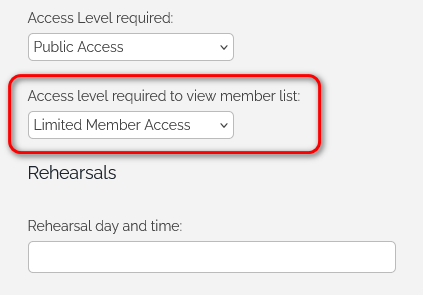
It defaults to "Limited Member Access" (so the public can't see the list of members).
If you have any questions, please don't reply to this email. Please send them to support@harmonysite.com, as usual.
In harmony,
Mark Virtue
HarmonySite
Australia
+61 2 8005 4277 (Australian number)
In North America, call: 1-415-651-7009 (San Francisco number)
Skype name: mvirtue